
RepoDB Desktop Studio: Initial Development Status
Published:
Back in September, I wrote about the Data Platform initiative and how the last few months were only an initial move toward a much bigger picture. Today I want to share the first concrete piece of that picture: RepoDB Desktop Studio.
What It Is
RepoDB Desktop Studio is a cross-platform desktop application, running on Linux, Windows, and Mac, where a user can sit down, connect to their data, and simply start playing around with it. No server to stand up, no heavy install, just a desktop app that gets out of your way and lets you explore and work with your data directly.
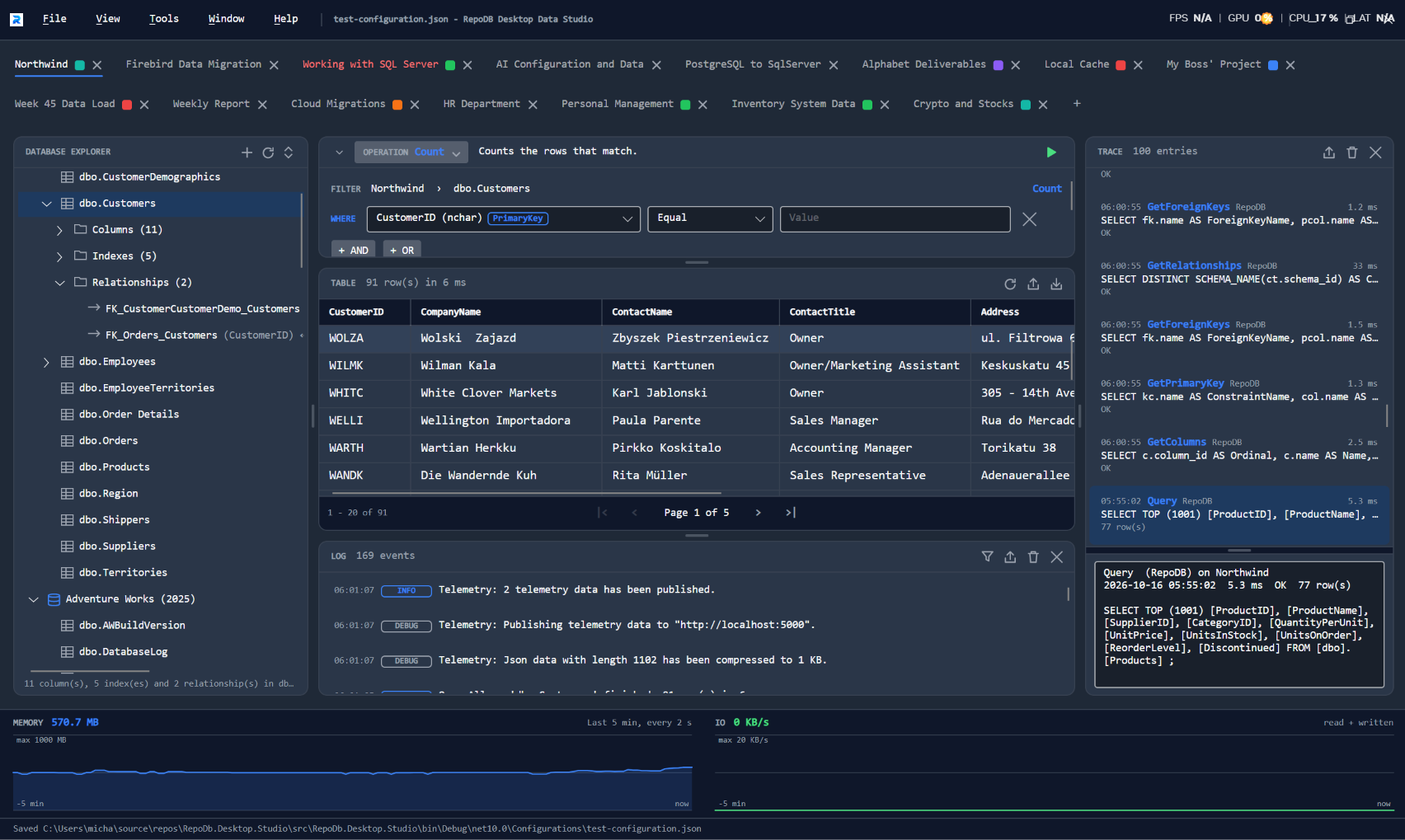
I want to be upfront about where it stands today: it is not fully Data-Engineering ready yet. This is an initial status update, not a finished product. It will continue to be developed, with the next big focus being Data Movement capabilities and letting users build actual data pipelines on top of it. What is here now is the foundation that makes that possible.
What It Can Do Today
- Dynamic tabs for different activities and priorities, so you can keep multiple lines of work open side by side instead of losing context switching between them.
- Meta-driven DB object exploration, browsing tables, views, and other database objects driven by metadata rather than hardcoded per provider.
- Data manipulation with secured PUSH operations, built with security in mind from the start rather than bolted on afterward.
- Import and export of data files, covering CSV, JSON, and XML.
- Logging and tracing of activities, for audit purposes.
- Telemetry insights, for monitoring how the application and its operations are behaving.
- Resource management, so the UI stays aware of consumption and does not get in the way of the data work you are actually trying to do.
What’s Planned Next
This is where it gets exciting, and where the “Data-Engineering ready” part of the story starts to take shape:
- Schema and data movement across different databases and files.
- YML-based schema configuration, so schemas stay portable instead of locked into one environment.
- Data manager, for managing the creation of databases directly.
- Parquet and Avro file support.
- Data pipeline scheduling, similar to what you can already do with Databricks.
- Azure and Amazon integrations for online databases.
- Snowflake and Databricks integrations.
- More database support, including Redshift, KingbaseES, and others.
Why This Matters
RepoDB Desktop Studio is not a side experiment detached from everything else I have been building. It is the user-facing piece of the same Data Productivity Platform direction I laid out in September, sitting alongside the ORM and the provider work that has been going on for months. The goal is the same one that has driven RepoDB from the start: give people a thin, approachable tool that lets them get real work done with their data without first fighting the tool itself.
This is an initial status, and there is a lot of ground left to cover before it is ready for serious Data Engineering workloads. But the core is there, and the direction is clear. More updates as this keeps moving.
~ This post is refined by AI, but is reviewed and gatekept by me before posting ~